






Steam Controller: Features, Setup, Compatibility & 2026 Guide
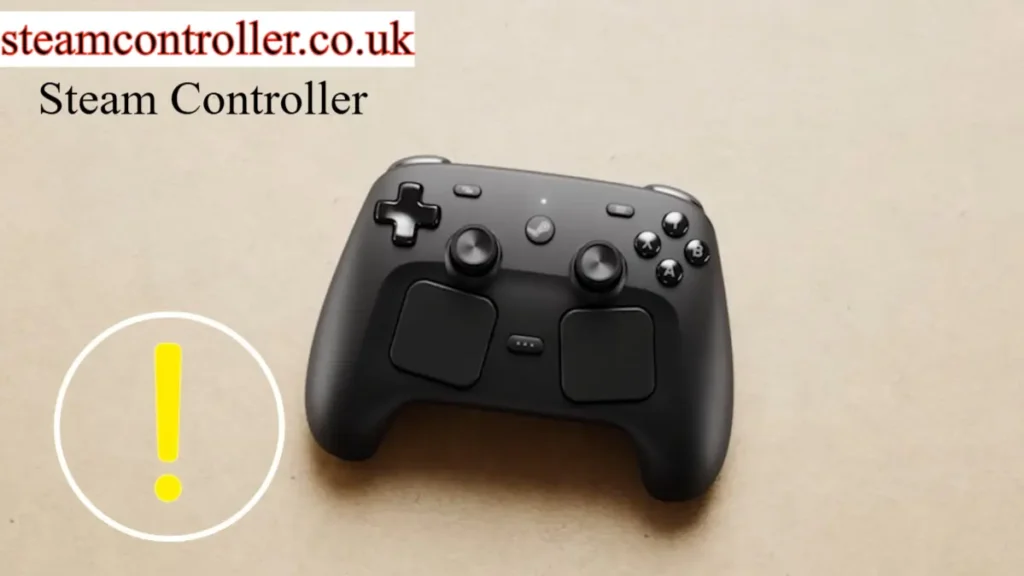
The Steam Controller is a PC gaming controller designed by Valve to give players more control and customization than a traditional gamepad. The original Steam Controller launched in 2015 and introduced features such as dual trackpads, customizable controls, back grip buttons, motion controls, and dual-stage triggers.
Unlike a conventional controller, the Steam Controller was designed to work with games that were not originally built for gamepads. Its trackpads and Steam Input software allow players to configure buttons, mouse-style controls, keyboard commands, and other inputs to suit different games.
Today, it is important to distinguish the original 2015 Steam Controller from Valve’s newer Steam Controller hardware. The original model is a discontinued-generation product, while Valve’s newer controller hardware represents a separate generation.
This guide explains the Steam Controller’s features, Steam Input, setup, compatibility, advantages, limitations, and what you should know before buying or using one in 2026.
What Is the Steam Controller?
The Steam Controller is a gaming controller developed by Valve for PC gaming.
The original model was released on November 10, 2015. It was created to provide a more flexible alternative to traditional gamepads, particularly for PC games that normally use a keyboard and mouse.
Its most recognizable features include:
- Dual trackpads
- Analog stick
- Back grip buttons
- Dual-stage triggers
- Gyroscope
- Accelerometer
- HD haptics
- Wireless connectivity
- Wired USB connectivity
- Customizable control configurations
The controller can also use community-created configurations through Steam, allowing players to customize how different games respond to each button or control surface. uk.pcmag.com
Steam Controller Features
Dual Trackpads
The dual trackpads are one of the features that make the Steam Controller different from conventional gamepads.
The trackpads can be configured for different types of input, including mouse-style movement, virtual joysticks, trackballs, scrolling, and other control schemes.
This makes the controller particularly interesting for games that traditionally rely heavily on mouse input.
Why Are the Trackpads Useful?
They can provide:
- Precise cursor movement
- Mouse-like aiming
- Custom radial controls
- Scrolling
- Virtual joystick input
- Alternative control schemes
However, they also require some adjustment if you are accustomed to a standard right analog stick.
HD Haptic Feedback
The original Steam Controller uses haptic actuators in its control surfaces.
The haptic feedback can provide different sensations depending on the type of input being used.
For example, Valve designed the system to provide tactile feedback when using the trackpads for things such as virtual trackballs or scrolling.
This makes the trackpads feel more informative than a completely flat touch surface.
Dual-Stage Triggers
The Steam Controller’s triggers can provide two different types of input.
The trigger can register analog movement during the pull and a second digital input when the trigger reaches its click point.
This allows players to configure different actions for different stages of the same trigger.
For example, one stage could be used for aiming while another activates an action such as firing.
Back Grip Buttons
The original Steam Controller includes buttons on the rear grips.
These buttons can be assigned to different commands through Steam Input.
They can be particularly useful when you want to perform an action without removing your thumb from the analog stick or trackpad.
For competitive games, this can potentially make certain actions easier to access.
Gyroscope and Motion Controls
The Steam Controller also includes gyroscope and accelerometer sensors.
These sensors allow motion-based controls to be configured for compatible games and control profiles.
For example, motion controls can be used for:
- Aiming
- Steering
- Camera movement
- Fine adjustments
- Motion-based input
Steam Input has also continued to receive improvements around gyro aiming and other controller features. Valve has highlighted gyro aiming and FlickStick functionality as part of its controller software development.
What Is Steam Input?
Steam Input is Valve’s controller configuration system.
It allows players to customize how their controllers interact with games.
Steam Input supports a wide range of controller types, including Xbox controllers, PlayStation controllers, Nintendo Switch Pro Controllers, DirectInput gamepads, and the Steam Controller.
This is one of the most important parts of the Steam Controller experience.
Instead of being limited to the controls provided by a game developer, you can potentially create your own configuration.
What Can You Do With Steam Input?
Depending on the controller and game, Steam Input can allow you to:
- Remap buttons
- Create custom layouts
- Configure trackpads
- Configure gyro controls
- Assign keyboard commands
- Assign mouse controls
- Create radial menus
- Use community configurations
- Customize controller sensitivity
- Combine different input types
Valve has stated that Steam Input supports more than 300 controllers and has continued expanding controller support.
How to Set Up a Steam Controller
Setting up an original Steam Controller generally involves connecting the controller to your computer and configuring it through Steam.
Step 1: Install Steam
Install the latest Steam client on your compatible computer and sign in to your account.
Step 2: Connect the Controller
Depending on your hardware and available accessories, you can connect the controller through its supported wired or wireless connection.
The original Steam Controller was designed to support both wired and wireless operation.
Step 3: Open Steam Controller Settings
Open Steam’s controller settings and check whether the controller is detected.
Step 4: Select a Game
Choose the game you want to configure.
Step 5: Open the Controller Configuration
Use Steam’s controller configuration interface to assign buttons, trackpads, triggers, gyro controls, and other inputs.
Step 6: Test Your Configuration
Launch the game and test your controls.
If something feels uncomfortable, return to the configuration screen and adjust the layout.
Does Steam Controller Work With PC Games?
Yes.
The original Steam Controller was specifically designed for PC gaming and Steam.
One of its major selling points was its ability to provide controller-style input for games that were traditionally designed around keyboard and mouse controls.
However, compatibility and the quality of a particular configuration can vary between games.
Some games will feel natural with a controller, while others may require considerable customization.
Can You Use Steam Controller With Non-Steam Games?
Steam Input can also be useful for games and applications that are not originally distributed through Steam.
A common approach is to add a non-Steam game to your Steam library and then configure its controller input through Steam.
However, compatibility can vary depending on the game, launcher, anti-cheat system, and input method.
Therefore, a non-Steam game should be tested individually rather than assuming every title will work perfectly.
Steam Controller vs Traditional Controllers
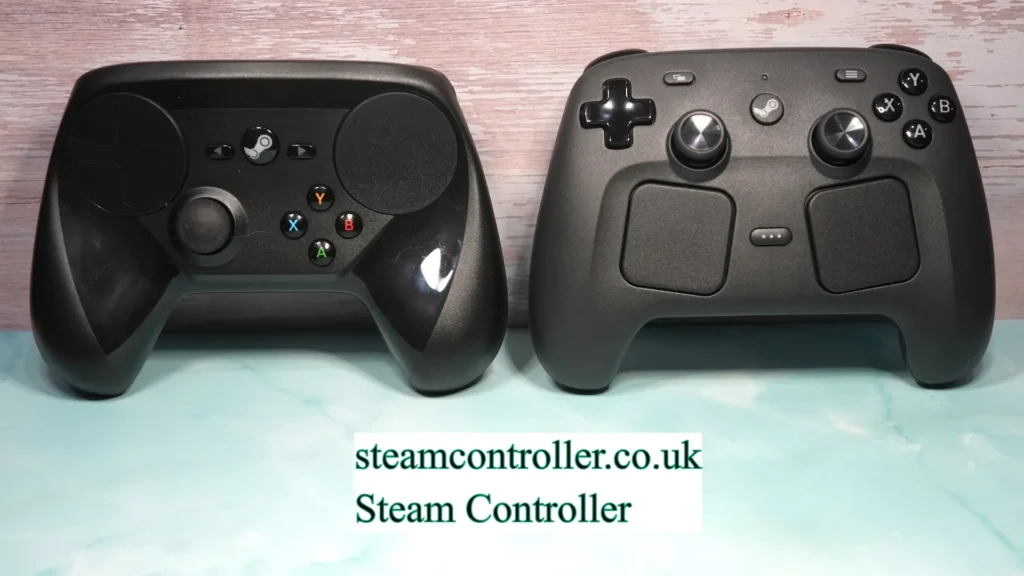
The Steam Controller takes a different approach from conventional controllers.
| Feature | Steam Controller | Traditional Gamepad |
|---|---|---|
| Analog Stick | Yes | Usually |
| Trackpads | Yes | Usually No |
| Back Buttons | Yes | Depends on model |
| Gyroscope | Yes | Depends on model |
| Custom Controls | Extensive | Varies |
| Mouse-Style Input | Strong | Usually Limited |
| Learning Curve | Higher | Usually Lower |
| Steam Input | Designed Around It | Supported for Many Controllers |
The biggest difference is customization.
A conventional Xbox-style controller is usually easier to understand immediately, while the Steam Controller offers more opportunities to customize controls.
Steam Controller vs Xbox Controller
If you want a simple plug-and-play experience, an Xbox controller may be easier for many PC gamers.
The Steam Controller is more attractive if you want:
- Extensive customization
- Trackpad input
- Mouse-style controls
- Gyroscope controls
- Custom profiles
- More flexible input mapping
Valve’s Steam Input system supports Xbox controllers as well as many other devices, so you are not limited to Valve hardware when using Steam’s controller configuration system.
Steam Controller vs PlayStation Controller
PlayStation controllers can also work with Steam Input.
Valve has specifically highlighted expanded PlayStation controller support, including support for DualSense Edge and other compatible PlayStation devices.
The main difference is that the Steam Controller was designed around highly customizable PC input, while modern PlayStation controllers offer a more traditional gamepad experience with their own advanced features.
Is the Steam Controller Good for FPS Games?
It can be.
The trackpad can be configured for mouse-like aiming, while the gyroscope can be used for additional aiming adjustments.
However, whether you prefer it over a traditional analog stick depends heavily on your personal preference and configuration.
Players accustomed to mouse-and-keyboard controls may particularly appreciate the ability to combine controller and mouse-style inputs.
Is the Steam Controller Good for Strategy Games?
The Steam Controller can be useful for some strategy and management games because its trackpads can emulate mouse-style controls.
This is one of the areas where its design differs significantly from conventional controllers.
However, complex strategy games can still require many commands, so creating a comfortable configuration may take time.
Is the Steam Controller Good for Racing Games?
The controller can be used for racing games through its analog stick, triggers, and motion controls.
The gyroscope can also be configured for steering in suitable games or configurations.
Valve’s original specifications specifically mention motion sensors capable of supporting tilt-to-steer functionality.
Steam Controller Limitations
Despite its flexibility, the Steam Controller is not perfect.
1. Learning Curve
The trackpads and extensive configuration options can take time to learn.
2. Unusual Layout
Players used to Xbox or PlayStation controllers may initially find the layout unfamiliar.
3. Configuration Can Take Time
Some games may require manual configuration to achieve the control scheme you want.
4. Hardware Availability
The original 2015 model is an older generation product, so availability and condition can vary.
5. Not Every Game Feels the Same
A configuration that works perfectly for one game may not feel good in another.
Is the Original Steam Controller Still Worth Using in 2026?
It can be, but it depends on your expectations and the condition of the hardware.
The original Steam Controller remains interesting because of its unusual input design and deep customization.
It can be particularly appealing if you enjoy:
- PC gaming
- Custom controller layouts
- Trackpads
- Gyro aiming
- Steam Input
- Experimenting with control schemes
However, buyers should remember that the original 2015 model is older hardware.
If buying one used, check the controller’s physical condition, buttons, trackpads, wireless accessories, and battery compartment before purchasing.
What About the New Steam Controller?
This is an important distinction for readers in 2026.
The original Steam Controller (2015) should not be confused with Valve’s newer Steam Controller hardware.
Valve’s current hardware ecosystem includes a newer generation of Steam Controller, while the original product remains separately documented on Steam.
Because availability, pricing, shipping, and reservation timelines can change, readers should check Valve’s current Steam hardware information before purchasing.
How Does Steam Input Support Other Controllers?
One of Steam Input’s biggest advantages is that you do not need an original Steam Controller to benefit from the system.
Valve’s documentation lists support for major controller families and DirectInput gamepads.
Valve also reported in 2024 that controller use on Steam had grown substantially, with Steam Input supporting more than 300 controllers.
This means SteamController.co.uk should not focus exclusively on the physical Steam Controller.
It can also cover:
- Steam Input
- PC controller setup
- Controller troubleshooting
- Gyro controls
- Controller comparisons
- Steam-compatible controllers
That gives the website a much broader and more sustainable topical focus.
Best Reasons to Use a Steam Controller
The Steam Controller can make sense if you want:
Customization
You can create highly customized control schemes.
Mouse-Like Input
The trackpads can provide mouse-style control.
Motion Controls
The gyroscope can provide another layer of input.
PC Gaming Flexibility
Steam Input allows different controller types and control methods to work with Steam games.
Community Configurations
Players can use and modify community-created control configurations.
Who Should Avoid the Steam Controller?
The controller may not be the best choice if you:
- Want a conventional Xbox-style layout
- Do not want to customize controls
- Prefer simple plug-and-play hardware
- Dislike trackpad controls
- Do not want to learn a different control scheme
For these players, a conventional PC controller may be more comfortable.
Steam Controller Specifications
The original Steam Controller included the following major hardware features:
| Feature | Original Steam Controller |
|---|---|
| Release | November 10, 2015 |
| Trackpads | Dual |
| Analog Stick | Yes |
| Gyroscope | Yes |
| Accelerometer | Yes |
| Haptic Feedback | HD haptics |
| Triggers | Dual-stage |
| Back Buttons | Yes |
| Connectivity | Wired / Wireless |
| Batteries | 2 AA |
| USB | Micro USB |
| Wireless Range | Approximately 5 meters under Valve’s stated testing conditions |
These specifications come from Valve’s original Steam Controller product information. Actual battery life and wireless performance can vary depending on usage and conditions.
Frequently Asked Questions
What is a Steam Controller?
The Steam Controller is a Valve gaming controller designed primarily for PC gaming and Steam. The original model introduced dual trackpads, customizable controls, back buttons, motion sensors, and dual-stage triggers.
Is the Steam Controller still supported?
Steam continues to support the Steam Controller within its Steam Input ecosystem, and Valve’s documentation lists the Steam Controller among supported devices.
Is the original Steam Controller discontinued?
The original 2015 Steam Controller is a discontinued-generation product. It should be distinguished from Valve’s newer Steam Controller hardware.
Does Steam Controller work with Steam games?
Yes. It was specifically designed for Steam and PC gaming, including games that were not originally designed for traditional controller input.
Does Steam Input support Xbox controllers?
Yes. Valve’s Steam Input documentation lists Xbox controllers among supported devices.
Does Steam Input support PlayStation controllers?
Yes. Steam Input supports major PlayStation controller models, and Valve has continued expanding PlayStation controller support.
Can Steam Controller use gyro aiming?
Yes. The original Steam Controller contains a gyroscope and accelerometer, allowing motion-based input to be configured.
Does Steam Controller have a mouse?
It does not contain a physical mouse. However, its trackpads can be configured to provide mouse-style input.
Does Steam Controller have back buttons?
Yes. The original Steam Controller has rear grip buttons that can be assigned through its configuration system.
Is Steam Controller good for PC gaming?
It can be excellent for players who value customization and mouse-style controls, but people accustomed to conventional controllers may need time to learn its layout.
Can I use Steam Input without a Steam Controller?
Yes. Steam Input supports many different controllers, including Xbox, PlayStation, Nintendo Switch Pro, and DirectInput devices.
What is the biggest advantage of Steam Input?
Its biggest advantage is flexibility. Players can customize controller inputs and use different control methods instead of being restricted to a game’s default layout.
Final Verdict
The Steam Controller remains one of the more unusual approaches to PC gaming hardware.
The original 2015 model introduced dual trackpads, back buttons, gyro controls, haptic feedback, and extensive customization at a time when most PC controllers followed a much more traditional design.
Its biggest strength is flexibility.
Its biggest weakness is the learning curve.
For players who enjoy experimenting with controller layouts and using Steam Input, the concept remains highly relevant. For players who simply want a familiar gamepad, a traditional Xbox- or PlayStation-style controller may be easier.
Most importantly, when researching the product in 2026, make sure you distinguish the original Steam Controller (2015) from Valve’s newer Steam Controller hardware.
Author Bio
A gaming technology enthusiast and peripheral specialist with extensive experience testing and analyzing gaming input devices across multiple platforms. Passionate about innovative gaming hardware and helping players understand how different controllers can enhance their gaming experiences. Dedicated to providing honest, detailed assessments that help gamers make informed purchasing decisions based on their specific needs and preferences.
Also Read